Proxmox: A shallow dive into disk performance overheads with KVM and ZFS
Click me if you’re just here for the results
Today I’m writing about disk performance. More specifically, SSD performance in KVM (Kernel-based virtual machines) nodes using VirtIO disks on top of a ZFS filesystem. I’m not looking to get a deep understanding of this technology right now, and you, my dear reader, should not use what I’ve found here as a definitive answer. It may however serve as a starting point for further fun.
The reason why this benchmark exists is somewhat contrived. I want to run a proper HA Kubernetes cluster on my homelab. This in and of itself is not a big issue, especially not with low-overhead solutions like k3s that are well suited to a home environment with workloads that are, let’s be honest, not that impressive. However, since I want this to be proper HA so that I can play with scaling and resilience testing, I need persistent data to be available across all the nodes in the cluster. This introduces the need for a distributed block storage solution. In many such cases, and probably in most production environments, this problem is solved by using solutions like SANs or maybe something hyper converged with Ceph or similar. My homelab is pretty small scale (for now…) and I’m looking for a more software and Kubernetes-oriented solution.
Enter: Longhorn (Not the Windows Vista prototype, I’m old). This seems like a suitable solution for my use case, and it allows me to ensure that all persistent data is replicated across most/all of my nodes. However, it is clear that there is a performance penalty (as with most things) and I would like to get a feel for what the actual performance of my nodes will be.
Let’s get cracking!
Hardware and storage configuration
| Type | Spec |
|---|---|
| Operating System | Proxmox VE 8.0.3 |
| CPU | AMD Ryzen 9 5900X 12-core |
| RAM | 64GB 3200MHz |
| OS Storage | 2x Kingston A400 240GB S-ATA (BTRFS RAID1) |
| VM Storage | 2x Kingston DC1500M 960GB Enterprise SSD (ZFS Mirror) |
This is my Proxmox node, whose job it is to run all of my VMs. It uses consumer hardware, because I’m cheap. The important bit is the VM storage, which is built on some enterprise NVMe drives I got while on sale a while back. Since ZFS has a heavy write amplification penalty, consumer SSDs tend to die quickly when using it.
The NVMe SSDs are arranged in a Mirror (RADI1) configuration for redundancy and the pool is configured with a 64k block size and with thin provisioning enabled.
Benchmarks
The benchmarks are being ran using fio, which is a standard and widely used tool for disk benchmarking. Fio is extremely powerful and flexible, but to keep things simple I am running the following benchmarks here:
- 1x 4KiB Random Write
- 1x 1MiB Random Write
- 16x 64KiB Random Write
As you may notice, I’m only doing random write tests. The reason for this is that I’m mostly interested in worst case scenarios, and these appear to be the best candidates. Reads are probably going to be pretty fast on these drives anyway. For each benchmark, I’m interested in the following metrics:
- IOPS
- Bandwidth (MiB/s)
- I/O Written (MiB)
Which should be a reasonable set of metrics to infer the given performance.
Test setup
These are the nodes that the benchmarks will be ran on.
| Descriptor | OS | CPU | RAM |
|---|---|---|---|
| pve | PVE 8.0.3 (host) | 24 cores | 64GB |
| 2gb | Ubuntu 22.04 | 4 cores | 2GB |
| 4gb | Ubuntu 22.04 | 4 cores | 4GB |
| 8gb | Ubuntu 22.04 | 4 cores | 8GB |
To see if the allocated RAM amount has any effect, I decided to go with three different sized VMs. There is quite a lot of caching and optimizations going on in the various levels of abstraction here, so it will be interesting to see how that affects the performance on the heavier writes that are more likely to saturate both RAM caches and the built-in DRAM caching on the drives themselves.
All the VMs have a separate, dedicated storage disk allocated to them in addition to the OS drive, configured as follows:
- Type: SCSI
- Cache: None
- IOThread: Enabled
- SSD Emulation: On
- Discard/TRIM: On
These options are a best guess based on the information I’ve found around from people who have done similar testing, as well as the official documentation.
Results
1x 4KiB Random Write
This starts off pretty interesting. I would expect the performance in general to be higher on PVE, with none of the QEMU abstractions in the way. However, what we see here is that the delta between PVE and the largest of the nodes is nearly 100%. I highly suspect that RAM caching in QEMU is at play here, especially considering how the performance scales higher when more RAM is available on the VM. I don’t really have a good explanation of why this is happening, I’ll have to dig deeper into the literature to find out.
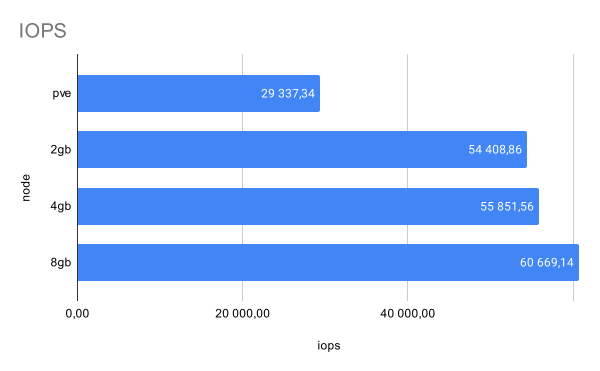
Decent IOPS numbers. It appears that these enterprise grade SSDs are pretty fast, after all.
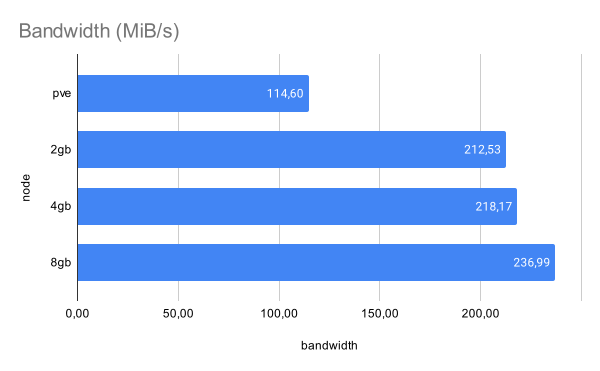
This doesn’t seem that impressive, but keep in mind that these are random writes, one of the most punishing workloads you can give a storage device. I suspect that a clean sequential write job would be orders of magnitude higher.
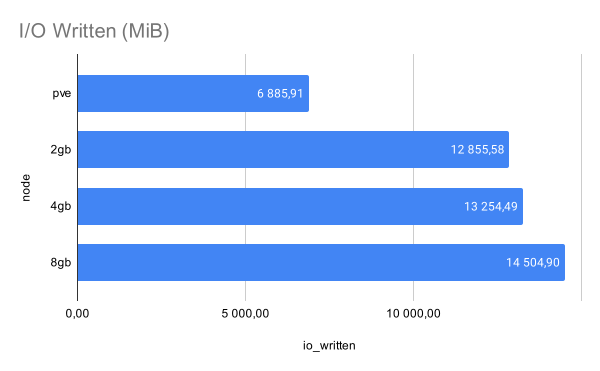
Not surprisingly, the amount of MiB written tracks with the reported bandwidth and IOPS.
16x 64KiB Random Write
This test is pretty rough and really puts the whole stack through its paces. We’re writing the same amount of data, but hitting the disks with asynchronous writes to simulate many different processes accessing the underlying storage at the same time. This is probably a good approximation (however exaggerated) of the kinds of loads these disks will be under when Longhorn needs to both write new blocks to all replicas and server data to other applications. We clearly see very diminished performance here, and not nearly as impressive numbers.
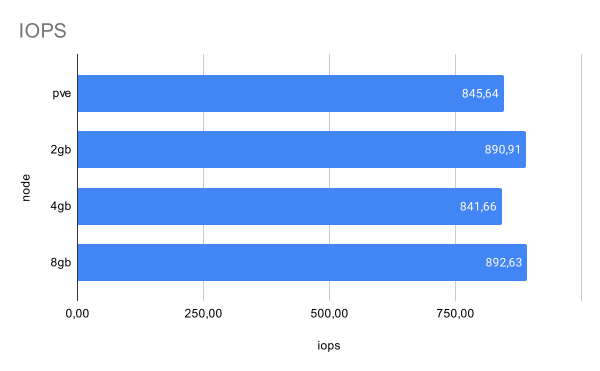
Kind of depressing drop in numbers here, but as expected given the workload.
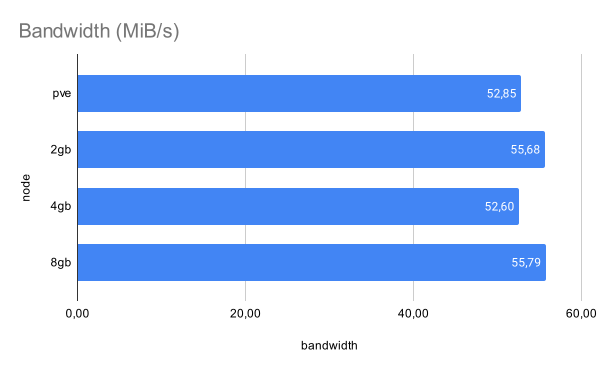
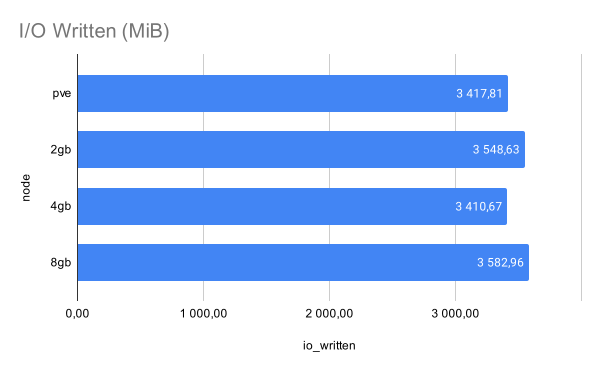
The good part about these results is that the performance delta is quite low, and the variance is small enough to almost be random and could probably swing either way if the test was repeated.
1x MiB Random Write
This gets us closer to sequential writes, with the large block size. This is kind of a best case scenario with random writes. This test really punishes SSDs with low or non-existing DRAM caching on board, so I would expect significantly reduced numbers on a consumer drive.
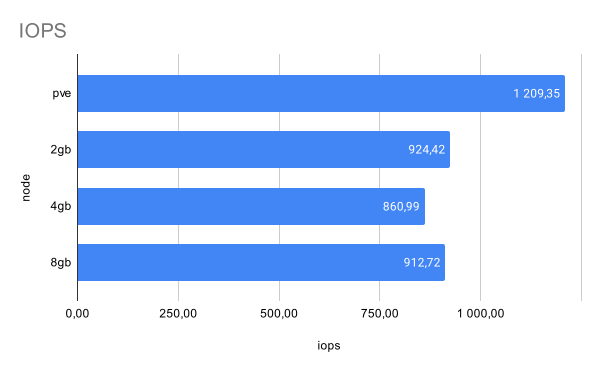
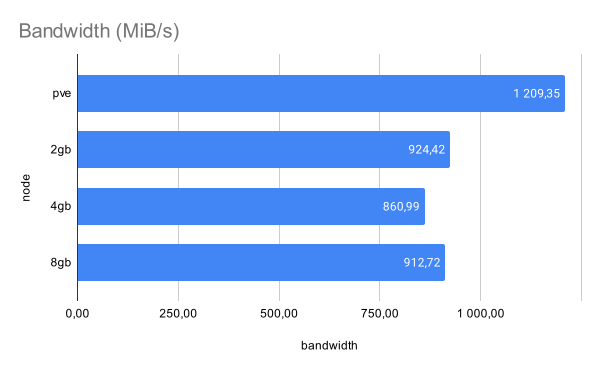
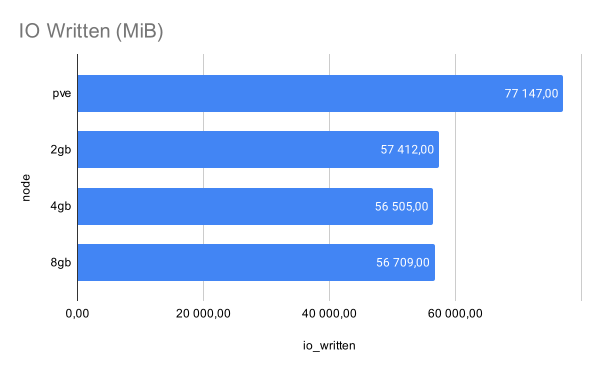
This test shows a clearer performance reduction between PVE and the VMs. I suspect that the larger amounts of RAM available to PVE helps to keep the speed of the writes up. Luckily, the overall performance drop isn’t too bad, all things considered.
Conclusion and closing thoughts
It’s clear, and not surprising, that some performance is left on the table when using these kinds of abstractions. I assume that more performance would be gained by passing NVMe drives directly to the VMs using PCIe Passthrough, which is well supported in KVM. However, that means that I need a 1-1 physical mapping between all worker nodes running Longhorn, and I would not be free to add or remove nodes at will. By using these abstractions, I can scale up and down the cluster as I see fit and not have to worry about which drive is mapped to which VM.
It’s not clear to me how these kinds of problems are solved for large-scale production workloads. I haven’t been able to find any literature on how to build the physical and virtual nodes in Longhorn clusters, what kind of hardware and what configuration they are in. Most, if not all, guides on Longhorn just state that you need a VM with some storage and you can install it via Helm, and they completely gloss over the resulting performance. The official documentation states to use a dedicated disk, but not if a virtual disk setup (as mine is) is acceptable or a physical separate disk.
That being said, I think the resulting performance will be just fine for my use case. If I notice slow-downs and issues, I may have to rethink my deployment strategy and do something else. If so, you can count on a Post Mortem being published.
Check out the next section for resources that I’ve used, including source code for my configurations, scripts, Ansible playbooks and Terraform instructions to set up the nodes for benchmarking.